
Copyright 2026 Electrical101.com All Rights Reserved. Question?


Ceiling Fan and Light Control Options
There are several ways to control ceiling fans and lights.
- No switch -
power goes directly to the fan fixture. Pull chains can be used to control the fan and lights. A remote and receiver can also be used. - 1 switch -
to turn power on/off to the fan lights. This can be replaced by a wall control switch. - 2 switches -
one switch turns power on/off to the fan, the other to the lights. - Wall control -
to adjust fan speed and lights. Wall controls are available for either 2 or 3 wire NM configurations. A wall control switch may or may not use a receiver. Find ceiling fan wall control - Remote control switch -
is paired with a receiver inside the fan canopy to control the fan and lights.
Common Causes of a Switch not Working
Loose wire(s) on the switch terminals.
A bad wire nut connection. This can happen because ceiling fans wobble. This could cause a poor wire nut connection to become a bad one.
The switch failed.
Tripped circuit breaker.
Common Causes of a Ceiling Fan with a Remote not Working
- Remote’s battery failed or is failing
- A bad wire nut connection.
- Wall switch failed or has loose wire(s) on the terminal(s).
- Receiver failed
- Tripped circuit breaker.
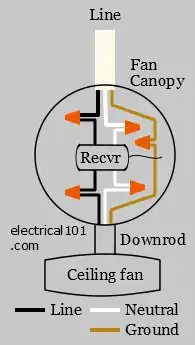
Line side
Load side
No switch or wall control, remote and receiver
Ceiling Fan Troubleshooting Sequence
No switch or wall control, no receiver:
Check for power at ceiling fan.
No switch or wall control, remote and receiver:
- Check batteries in the remote
- Check for power at receiver line terminal
- Check for power at receiver load terminal
- Check for power at ceiling fan.
Switch or wall control, no receiver:
- Check for power at switch line terminal
- Check for power at switch load terminal
- Check for power at ceiling fan.
Wall control, receiver:
- Check for power at switch or wall control line terminal
- Check for power at switch or wall control load terminal
- Check for power at receiver line terminal
- Check for power at receiver load terminal
- Check for power at ceiling fan.
Troubleshoot Ceiling Fan Receiver
A ceiling fan receiver is an electronic switch that is controlled by a wall switch or a remote. The best way to troubleshoot a ceiling fan remote is with a voltage detector. Always use a voltage detector on a known good circuit before use to verify the detector is working properly.